

Goniobranchus leopardus (Rudman, 1987) collected in Timor-Leste by Florida Museum of Natural History Invertebrate Zoology (licensed under CC BY-NC 4.0). https://www.gbif.org/occurrence/5139695359
Specify 7.12.1 Release Announcement
Specify 7.12.1 is all about data discoverability. This release brings a redesigned Express Search with a visual configuration editor, a smarter Query Builder with taxon synonym search and catalog number range support, and a new direct export path to the Specify Web Portal, closing the loop between finding your data and making it accessible to others. This update also brings a new Batch Identify tool for clearing identification backlogs, a mapping-file option for the Batch Attachment Uploader, and an updated Chronostratigraphy tree that sorts nodes chronologically and displays geologic time ranges. All of these new developments make it easier and faster to find the right specimen data. They bring your collection’s data to the people who need it, both inside and outside your institution.
All-New Express Search
Simple Search has evolved into Express Search, and it’s no longer a “one-size-fits-all” search. A new visual editor lets all users configure which fields, tables, and sort order Express Search uses. This can be configured per-user. If search default options are set across a collection, discipline, or an entire database, each Specify user can then configure search parameters individually.


Smarter Queries, Built for How Collections Actually Search
The Query Builder picked up several capabilities aimed squarely at discoverability:
- Higher row density and column resizing, so you can see more results at a glance and shape the query view to the fields that matter for a given search.
- Taxon synonym search, allowing users to find records even when they were entered under an older or alternate name, without needing to know every synonym in advance.
- Catalog number ranges in “In” filters, allowing users to search across ranges of catalog numbers in a single query using abbreviated values.


Export to Web Portal: Get Your Data Discoverable Beyond Specify
The Query Builder now supports exporting directly to Web Portal. Any query you build can now be exported for the Specify Web Portal to make your collection data discoverable to researchers, the public, or partner institutions, without a separate export-and-upload workflow. This helps close the loop between finding data internally and pushing them out for access externally.


Improvements to the Specify Web Portal are currently being engineered, with a public release expected early in 2027.
Batch Identify: Discoverable Data Starts with Accurate Identifications
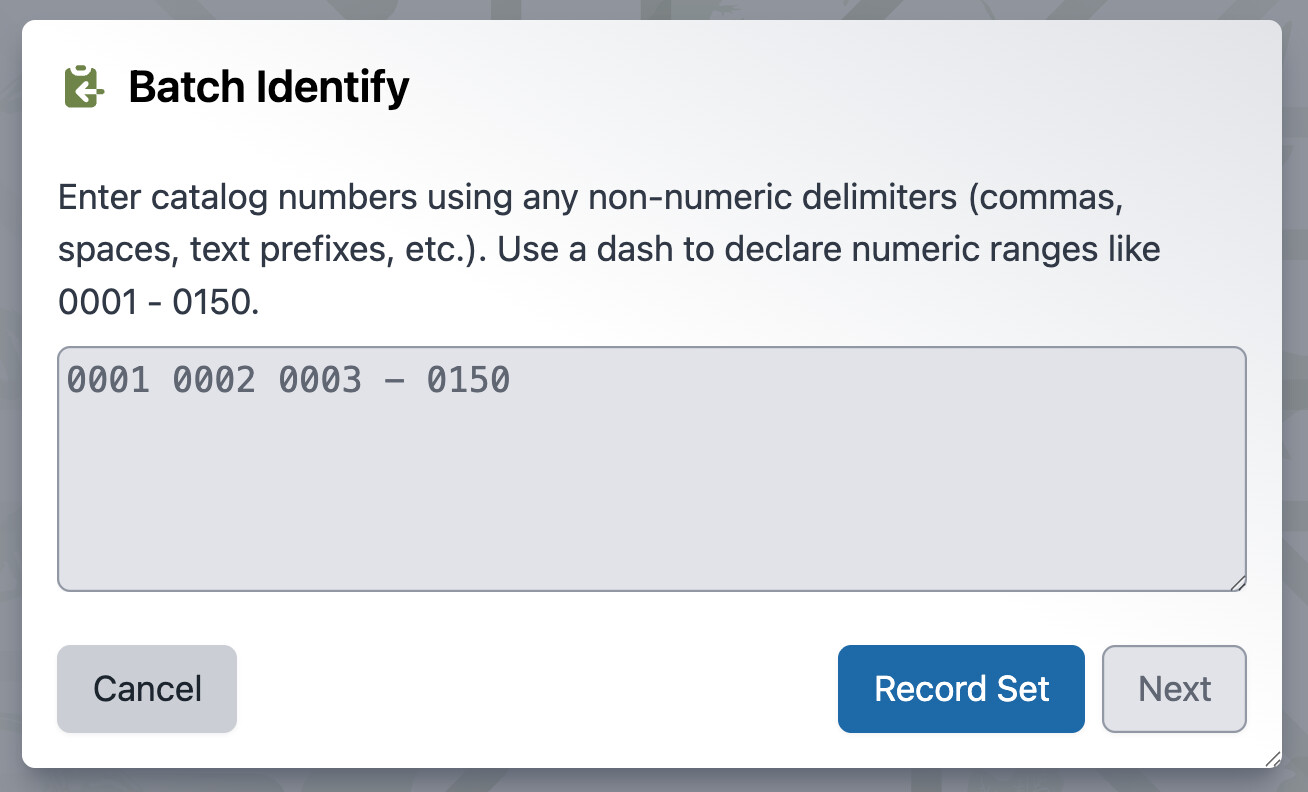
An all-new Batch Identify tool lets you create and assign a new Determination to a batch of Collection Objects at once. This capability makes it practical to clean up large backlogs of identifications in one pass, which directly improves the consistency of search results.

Batch Attachment Upload + Mapping Files
The Batch Attachment Upload tool has been updated to support a "Match by mapping file" option. It allows users to use a two-column CSV file, one column with Specify record identifiers and the other with local file names to then link external files to the appropriate data records without the need to rename files.


Chronostratigraphy Improvements
The Chronostratigraphy tree now sorts nodes in geologic time chronological order. It also now shows the start and end periods by default in the tree after each name, displaying its geologic time range in ICS format directly after the node name.
There is a new node filter dropdown at the bottom of the tree view. This filter controls which nodes are visible, allowing users to show all nodes, just Chronostratigraphy nodes, and just Biostratigraphy nodes.


Paleo Context now restricts searches in the Biostratigraphy relationship field to only names where IsBioStrat is set to true.


7.12.1.2 (1 October 2026)
- Fixes an issue that resulted in too many joins being added to complex queries (#8529)
- Reverts a fix introduced in v7.12.0 (#7509) that allowed queries to disambiguate between multiple taxon columns (e.g., Host Taxon → Species and Determination → Species). A fix is planned for this in an upcoming release.
7.12.1.1 (4 September 2026)
- Allows exporting for web portal from queries with hidden fields (Issue #8494 | PR #8487)
- Stops unlinking tree relationships if rank is not present in BatchEdit (Issue #8469 | PR #8487)
7.12.1 (28 August 2026)
Added
- The Bulk Attachment Uploader supports a new “match by mapping file” option for attachment uploads (#8311 - Requested by University of Michigan, University of Kansas, Queensland Herbarium, Muséum d’histoire naturelle Geneva, The University of Texas at Austin, and many others)
- All-new Batch Identify tool, enabling users to create and assign a new Determination to a batch of Collection Objects at once (#7769 - Requested by University of Kansas and many others )
- New visual editor for configuring Express Search (#7976)
- The Query Builder now has dramatically improved row density and added column resizing (#7908)
- Query Builder can now search on taxon synonyms (#5137)
- Catalog number ranges are now supported when using the “In” filter in Query Builder (#7814)
- Export to Web Portal has been added to the Query Builder (#7994)
- Attachments can now be added to existing rows in WorkBench data sets with attachments (#7068)
- Major WorkBench & Batch Edit user interface improvements (#8165)
- “Upload Plan” has been renamed “Mapping”
- Validation and Upload dialogs now show a breakdown of the record counts
- The “Import/Export Mapping” dialog now properly validates the JSON file defining the mapping. It disallows invalid JSON.
- Added a new button to “Choose Existing Mapping” when creating a new data set from scratch.
- Warns before clearing mappings to prevent accidental loss of progress.
- Added helper texts to various places to provide better guidance on WorkBench-specific terminology and features.
- Added a link to the documentation on the Speciforum.
- Fixed an issue with table icon appearance in Firefox.
- A new biostratigraphy filter has been added to the Chronostratigraphy tree (#8257)
- A Close button has been added to App Resources (#8137)
- WorkBench supports a new “Pick first” disambiguation option to arbitrarily choose a record to match to (#8054)
- HEIC/HEIF thumbnail support for attachments (#8247)
- New command-line tool to sync schema configuration (#7689)
- A notification will now be shown while a new collection is being created using System Config (#7827)
- Support for Norwegian Bokmål and Croatian in the interface (#7958, #7819)
- The “Show Interactions” button in Preparations now shows all interactions associated with the preparation, not just loans and gifts (#6110)
- The Chronostratigraphy tree is now sorted by period instead of name, and displays date ranges (#8254)
Changed
- Merging tree nodes has been made substantially faster across all trees (#8031)
- New disciplines can now be deleted once they have no users or collections attached (#7812)
- Added better schema field descriptions throughout the app (#8075)
- Attachment ordering now uses an explicit ordinal value (#8017 - Reported by Natural History Museum of Denmark)
- Data model list is now sorted alphabetically (#8139)
- Boolean form fields now correctly respect a
falsedefault value (#7930 - Requested by Muséum d’histoire naturelle Geneva and California Academy of Sciences) - The WorkBench now preserves the mapped
createdByAgentvalue (#7931 - Requested by California Academy of Sciences, Commonwealth Scientific and Industrial Research Organisation, and others) - Updated the About dialog to add new members and update license mention to GLPv3 (#8279)
Fixed
- Fixed query field order not being preserved during Batch Edit (#8023 - Reported by Cornell University Insect Collection, University of Michigan, University of Kansas, and many others)
- Custom view definitions for Attachment are now respected (#7811 - Reported by Natural History Museum of Denmark, University of Kansas, Queensland Herbarium, and Muséum d’histoire naturelle Geneva)
- Fixed resolved loans incorrectly blocking preparation count updates (#7829 - Reported by South African Institute for Aquatic Biodiversity, Florida Fish and Wildlife, and Virginia Institute of Marine Science)
- Fixed an issue where WorkBench and Batch Edit checks transfer permissions for both types of data sets (#7834 - Reported by Royal Botanic Garden Edinburgh)
- Fixed a crash that could occur when checking WorkBench attachment columns (#7420)
- Fixed the “Preparation count cannot be negative” warning appearing repeatedly (#7595)
- Removed duplicate “no preparation” warning (#7902)
- Fixed the error message shown when deleting tree ranks that still have associated nodes (#5029)
- Fixed an issue where setting an agent across collections in different divisions caused issues in Security & Accounts (#7802 - Reported by Natural History Museum of Denmark)
- Fixed the Chronostratigraphy tree name not appearing correctly in new disciplines (#7824)
- Fixed formatted fields to trim leading zeros while preserving decimal digits (#7809)
- Removed a non-functional “Add” button from
SpAppResource’s collection preferences (#7684) - Bad requests to Specify Network are now handled gracefully instead of erroring (#7951)
- Fixed an issue that caused invalid results to appear when using express search (#7911 - Reported by Pioneer Trails Regional Museum and The Ohio State University Museum of Biological Diversity)
- Fixed autocomplete fields requiring a double click due to a blur/mousedown race condition (#8011)
- Removed the limit on the number of record sets shown in the search dialog (#7916)
- Fixed leading zeros being suppressed in Collection Object Catalog Numbers during data entry (#8027)
- Fixed Query Builder crashes on Projects relationship queries (#8087)
- Fixed miscellaneous console errors on the Collection Object form page (#7907)
- Fixed WorkBench export using the wrong file extension for the selected delimiter (#8051)
- Fixed
latitude2not converting tolat2textin the WorkBench (#8100) - Fixed deleting attachments via the API alone (#8073)
- Corrected “meta data” to “metadata” as one word (#8135)
- Fixed the WorkBench column header sort toggle (#8123)
- Fixed Query Builder CSV exports not respecting the applied sort order (#8168)
- Fixed Accession Collection Object subview searches with multiple catalog numbers returning only the last number (#8226)
- Fixed formatted Collection Object query results for nested relationship fields (#7969)
- Fixed tree expand/collapse state syncing with the URL cache (#8263)
- Fixed Record Sets created from queries so they can themselves be filtered by Record Set (#8339)
- Fixed sort order not being preserved in exported CSVs (#8394)
- Fixed duplicate roles being created when a role’s description was edited (#8391)
Internal
- Dependency upgrades: flatted, lodash, fast-xml-parser, Django (4.2.27 → 4.2.30), react-router-dom, minimatch (transitive), Jest toolchain (28.1 → 30.3), underscore, handsontable, PyJWT, (#7890, #7892, #7899, #7886, #7895, #7917, #7914, #7947, #7944, #7920, #7888, #7997, #8332)
- CI/tooling: enabled CodeQL on push/PR, added a code-coverage measurement action, added a Django end-of-life checker script, added missing test requirements (#8092, #8278, #8068, #8280, #8377, #8229)
- Added indexes to Django models and migration files; added a missing migration for
SpecifyUser.spprincipals(#7568, #8237) - Automatic test coverage added across the Query Builder operators, permits, WorkBench uploads/exports, attachments, and more. (#8235, #8258, #8259, #8260, #8273, #8274, #8277, #8281, #8283, #8290, #8292, #8294, #8296, #8301, #8304, #8309, #8316, #8319, #8321, #8327, #8335, #8337, #8341, #8342, #8344, #8346, #8352, #8353, #8354, #8367, #8368, #8380, #8383, #8389)
- Documented API schemas for
download_allandseries_autonumber_range(#7815)
The full changelog is available on GitHub
For source code go to the GitHub Specify 7 repository
For more information about Specify 7, or about this release, see Specify 7 | Specify Collections Consortium, or email support@specifysoftware.org.